User Guide
Sending Guide
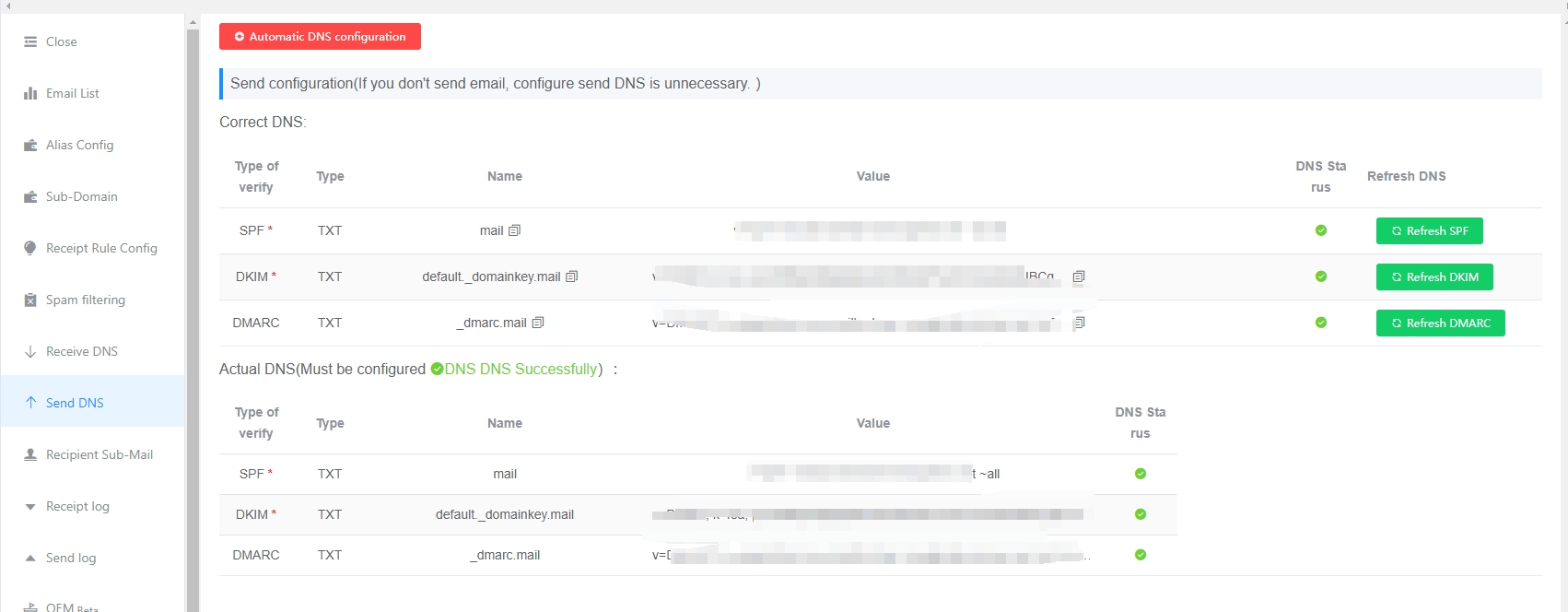
Outgoing DNS Records
- You need to configure outgoing DNS records before sending emails. Otherwise, your emails will most likely go to the recipient’s spam folder or be bounced directly.
- Outgoing DNS records are different from incoming DNS records. Click to view: Outgoing DNS setup guide. If you do not know how to configure them, you can contact customer support for remote setup Click to view: Customer support help
Sending Limits
- GetMX Domain-Email is for work use only. To ensure normal users’ email deliverability, please do not send the following types of emails. If detected by the system, your sending function will be restricted and no refund will be issued. If you use email for marketing purposes, please look for a dedicated marketing email service provider.
- Marketing or advertising emails
- Illegal emails involving pornography, violence, etc.
- Verification codes
- Bulk sending the same content to multiple external mailboxes
- Free users have sent large volumes of illegal advertisements, causing serious abuse and affecting normal users. Sending is therefore no longer supported for Free users.
- A single email can be up to 25 MB. Most email platforms, including Gmail, currently limit incoming emails to 25 MB; emails exceeding this size may be rejected or bounced. If you need to transfer large files, try using cloud storage to prevent the recipient from rejecting or bouncing the email.
Multi-Channel Sending
For sending external emails, multi-channel sending is supported. If one server fails to send or is rejected by the recipient, the system will try sending through another server.
- Internal emails (the recipient also uses GetMX and is not using a Scale mailbox): Sent through the internal channel and can arrive in seconds.
- External emails (Scale or recipients who are not using GetMX): Multi-channel email sending can be configured.
- After successfully modifying DNS records, wait a few hours before using them to prevent recipients from not recognizing the records yet.
- If the login prompt shows
Authentication failed, the password is incorrect. Please change your password, then continue here: Click to view: Change password
Quota
FAQ
Why can’t my mailbox send emails?
The following two conditions must be met. Please check them in order.
- Paid version
- Outgoing DNS records have been configured in the backend where the domain was purchased. Outgoing DNS records are different from incoming DNS records and must be configured separately.
Why do the emails I send go to the recipient’s spam folder?
Whether an email goes to spam depends on the recipient’s policies. You can check the following items:
- Sent email content
- Spam marketing emails
- Test emails (simple numbers or a string of letters are easily classified as spam)
- Domain
- If outgoing DNS records have just been configured, do not send emails immediately. Wait a few hours for the recipient to recognize the records. If the recipient has not recognized the records, sent emails may go to spam.
- The domain is classified as a risky domain by the recipient.
- Sending server
- The GetMX admin console supports multiple sending regions. The same region is more likely to be accepted by the recipient.
Why does the webpage show that sending failed?
How to troubleshoot a sending failure prompt
- Check the sending status in the admin console
- View sending logs https://www.getmx.com
- Sending too many test emails may cause them to go to spam. It is best to ask the recipient to whitelist the mailbox.
- Sending attachments larger than 25 MB may result in rejection or sending failure.
How do I set an avatar for sent emails?
- Setting avatars is not supported, because email itself does not support avatars.
- Why does the recipient see an avatar for emails sent from personal email services such as Apple/Microsoft/Gmail? Some clients display avatars because the recipient’s email client has set default avatars for some influential platforms. They are not set by the sender. Neither the sender nor the recipient can customize the avatar.
- If you see Apple’s avatar displayed in the Gmail client, it is because Apple is influential enough that the Gmail client has set an avatar for Apple.
- How do I set an avatar for my mailbox? You can also contact Gmail and ask Gmail to set an avatar for your mailbox, so recipients using the Gmail client will be able to see your avatar. However, even if the Gmail client sets an avatar for your mailbox, the avatar will still not appear if recipients use clients from other platforms to receive emails. You will also need to apply to the corresponding platforms for a custom avatar.