Paid Group Management
Receipt Rule Configuration
Access Path
Dashboard -> Multi-Domain Pay-Group -> Domain Manage -> Receipt Rule Config
What Are Receipt Rules
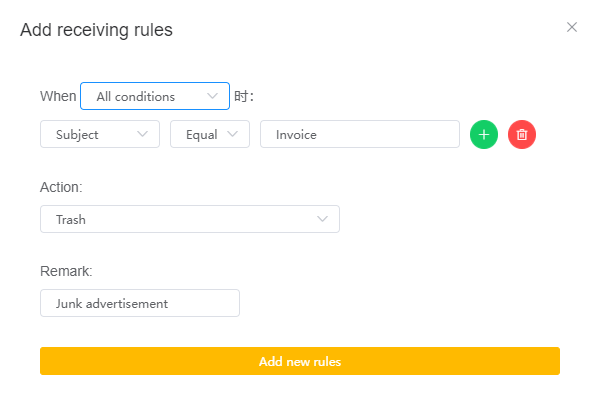
Receipt rules filter emails based on configured rules, reducing unwanted incoming mail. This not only improves mailbox loading speed but also reduces quota usage.
Filtering Methods
- Condition Matching
- Any Condition
- All Conditions
- Rules Support Filtering By
- Sender
- Recipient
- Subject
- Content
- Action Execution
- Discard Emails
- Move to Trash
Configuration Reference
Quota
- Up to 50 rules are supported. If this is not enough, contact customer service to increase the limit.
Important Notes
- A single rule can include multiple conditions, so you do not need to add multiple rules and reduce efficiency.
- Discarded emails do not use quota, while emails moved to Trash do use quota.
- System emails, such as bounce messages, system notifications, and announcements, do not follow receipt rules and will be delivered to the default folder.
- When configured as "Does Not Contain", only emails whose subject or content contains the specified content will be received; all other emails will be discarded. Whitelist logic can easily be misconfigured, so only configure "Does Not Contain" when you are very sure you want to receive emails with the specified content.